
Greetings, esteemed Cenchu users. Managing multiple email accounts can be a complex task. Fortunately, DirectAdmin offers a solution through its email forwarders feature, allowing for efficient redirection of emails from one address to another. This guide provides a comprehensive overview of the setup process to optimize your email management.
- Start by logging into your DirectAdmin dashboard. You can do this by visiting the link provided by Cenchu, usually in the format: https://your-domain.com:2222.

- Once inside, look for the ‘Email Manager’.

- Click on ‘Forwarders’.
Imagine you have two mailboxes: Your old email ID (OldEmailID@email.com) and your new email ID (NewEmailID@email.com). You want all the letters sent to your old home to automatically arrive at your new home. Here’s how you can do that with DirectAdmin:
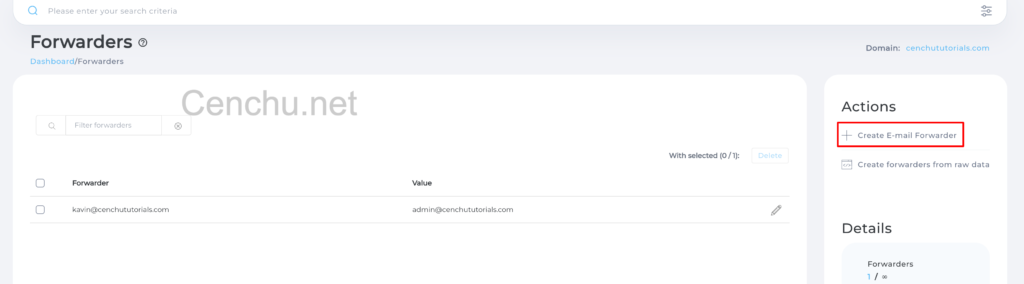
- Click on ‘Create Email Forwarder‘.

- On the New Forwarder Name field, Enter the Email ID of the emails that you want to receive. In this example – OldEmailID@email.com
- Since we want emails to be redirected, Select Email.
- On the second textbox, enter the email ID that you want your emails to be received on – NewEmailID@email.com
- Finally, click on ‘Create‘. This tells DirectAdmin to start sending all mail from your old Email to your new Email.
- Send a test email to the source address and check the destination inbox. If everything’s set up correctly, you should see your test email there!

Note: By clicking the green-colored ‘+ADD’ button, you can add one or more email IDs on both the “New Forwarder” Name and “Destination”.
- If you ever wish to stop forwarding, simply delete or disable the forwarder in DirectAdmin.
- Forwarders won’t store emails; they simply redirect them. So, if you want a copy stored in the original inbox, ensure you’ve set that preference.
Conclusion
And that’s it! With a few simple clicks, you’ve streamlined your email experience. We hope this guide makes your digital journey with Cenchu even smoother. If you have any questions or need a bit of extra help, our friendly Cenchu support team is always here for you. Happy emailing! 💌